How to use a baby monitor
This post contains affiliate links. If you buy through them, we may earn a small commission at no extra cost to you.Learn more.
Most of how to use a baby monitor comes down to four decisions you make once: where the camera goes, whether the thing ever touches your WiFi, how loud you set it, and where the handset sleeps. Get those right in the first hour and the monitor stops being a gadget you manage and turns into furniture. We own four, an Infant Optics, a VAVA, a VTech and a HelloBaby, compared in our best baby monitor roundup, across a room with two cots, so the routine below is the one that survived contact with our own nursery rather than a manual rewritten.
One note on scope before the steps. A baby monitor is a convenience device and not a safety one, and none of these is a medical device. Anything touching safe sleep, cord placement near a cot, or two children sharing a room is a question for the AAP and the CPSC, and for the manual that ships with your own monitor, rather than a blog, including this one. What we can tell you is how the things behave in daily use.
Charge the parent unit before you need it
The first thing to do with a new monitor is the least interesting one. Put the handset on its charger and leave it there while you deal with the camera, because the unit ships part charged and the moment you want it is usually a nap that is already starting.
This is also when to find out what class of battery you have bought, and the number to look for is hours rather than milliamp hours. Our VAVA is rated at about 5 hours from a 4500 mAh cell. The VTech carries 5000 mAh and behaves the same way, as an evening unit. The HelloBaby HB6560 is rated at 16 to 30 hours depending on mode. Those first two are monitors that live on a charger overnight and that is fine, as long as you know it before the first night rather than at 2 a.m.
Pair the camera and the handset
For a dedicated monitor there is usually nothing to do here. The camera and the screen arrive already paired over their own private 2.4 GHz FHSS radio link, so plugging both halves in is the entire setup, with no app and no account anywhere in it. That is the whole pitch of a unit like the HelloBaby, and it is why ours took minutes rather than an evening to get running.
If you have added a second camera, or you are re-pairing after a reset, the pairing menu lives on the handset and asks you to hold a button on the camera. Follow the sequence in your own manual, since the button and the timing differ by model and a half-completed pairing is the one failure that looks like a broken monitor.
Decide the WiFi question, then stop thinking about it
This is the decision that changes what the device is, and it is worth making deliberately.
A non-WiFi monitor cannot be reached over the internet, because it is not on the internet. You get no phone access and no remote viewing at all, by design, and in exchange there is nothing to set up and nothing exposed. A WiFi monitor joins your home network and lets you look in from outside the house, which genuinely matters if a grandparent sits with the baby or one parent travels. The price is an account, an app, and a monitor that behaves oddly when your internet does.
Plenty of units do both, and that is the case worth being relaxed about. Our VTech carries WiFi and a direct radio link, and the cameras talk to the parent unit over that private link whether or not you ever join the network. We have never connected it. It has run as a plain dedicated monitor since the day we set it up, so treat the app half as an option you can take later rather than a step you have to complete now.
Place the camera so it frames the whole cot
Camera placement is the part people redo three times, and the rule that saves you the reruns is to frame the whole cot rather than the baby.
A tight shot of a sleeping face looks great on day one and is useless the first time they roll to the far end. Back the camera off until the entire cot is in the picture, mounted high and slightly to one side so you are looking down into it rather than across it. A wall mount is the steadiest option. A shelf works if nothing on that shelf can be knocked into it.
A few cameras take this further. Our Infant Optics ships with a standard lens and an optical zoom lens that swap over in seconds, so a frame that is too tight or too wide is a lens change rather than a remount. It is the one monitor here where placement has a hardware answer.
If your camera pans and tilts from the handset, that changes the job. It means a placement that is roughly right is good enough, because you can correct the angle from the bed instead of opening the door. On the VAVA it is a button on the handset, and it is the feature we use most: following a baby who has shuffled into a corner without walking in and waking them. In a room with two cots, that same button is what lets one camera check on either child.
Cord routing around a cot is the one part of placement we are not going to write the how-to for. That is a safety question, it is covered in your monitor’s manual and in the CPSC guidance, and those are the sources to follow.
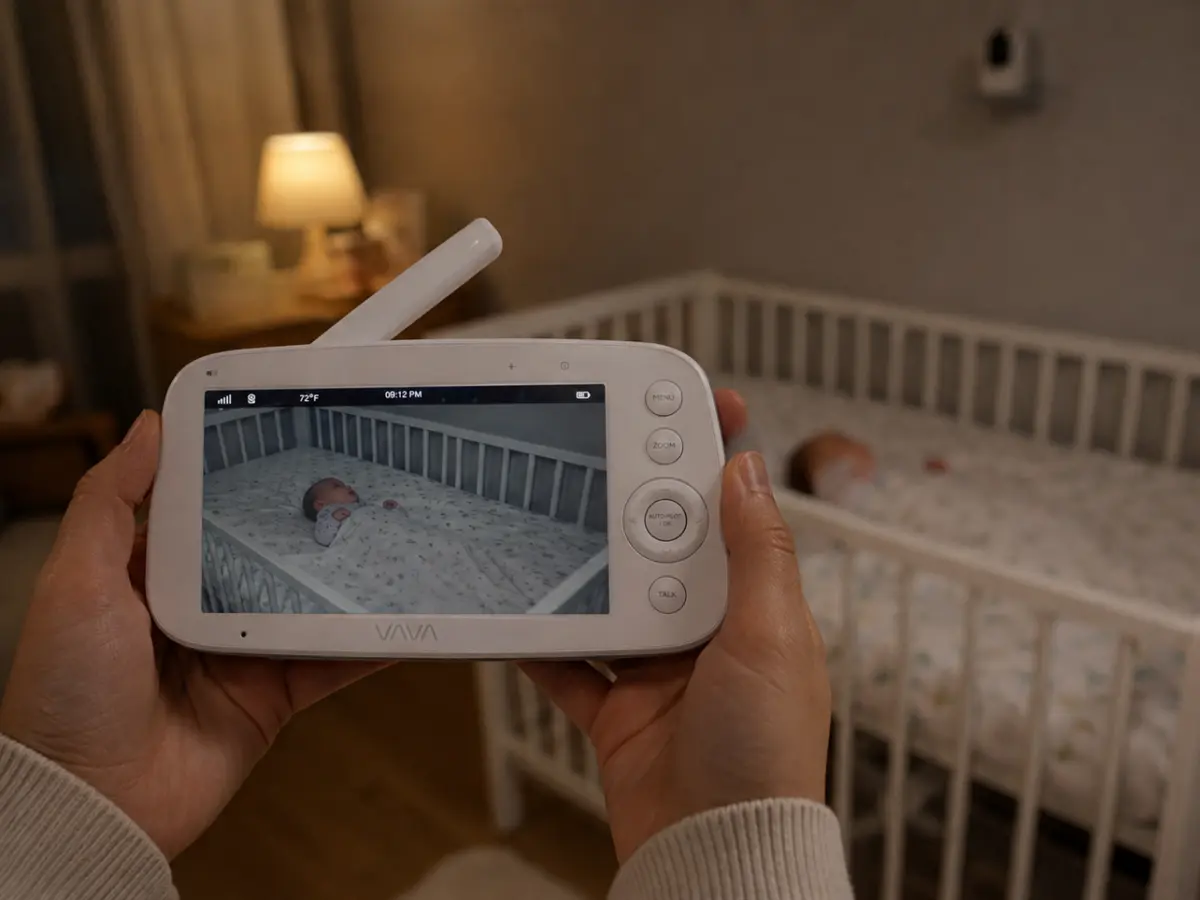
Set the sound before you set anything else
The screen is what you look at, but the sound is what actually does the work, because for most of the night nobody is looking at anything.
Set the volume high enough that it wakes you from across the room and then leave it alone. A monitor you have to strain to hear is one you quietly stop trusting, and once you stop trusting it you start getting up to check, which defeats the whole purchase. None of our four needs to go near maximum to do this, which is a good sign in a unit.
Two settings sit alongside the volume and are worth understanding. Sound activated mode keeps the screen dark until noise in the room crosses a threshold, which saves battery and stops a lit screen sitting in your face all night. And some units put the same information on a light instead: the HelloBaby has a bar on the front of the handset that runs from green to red as the room gets louder, so you can see that someone is crying with the sound muted entirely. That one turned out to matter more than it sounds when you are working in the next room.
If your monitor plays lullabies through the camera, test that at your own volume before you rely on it. On our VTech the sound comes back through the handset loud enough to drown out everything else, which rather defeats the point of playing it.
Leave night vision on automatic
Night vision is the setting that needs the least from you and gets fiddled with the most. Leave it on automatic. Infrared switches in on its own as the room darkens, and the picture it gives you is either good or it is not, which is a property of the camera rather than something a menu will fix.
What does help is knowing what you are judging. A monitor is read from four feet away, in the dark, half asleep, for about two seconds. Screen size matters more than resolution for that job. The HelloBaby is the lowest resolution we own at 480p and has the largest screen at 6 inches, and it is the easiest of the four to read from a bed. Our 1080p VTech is sharper and still loses that particular comparison. So if the night picture is frustrating you, the answer is usually a bigger screen rather than a setting.
Using it with two babies in one room
Both of ours share a room, so this part is not theoretical for us. There are two ways to cover it and they ask different things of you.
One camera that steers means you swing between cots from the handset. It is cheaper, it is one camera to place, and it works well when the cots are close together. Two cameras on a split screen means a camera over each cot and both on screen at once, so you can see at a glance which of them is awake. That is the version we keep coming back to, because it takes no input at all in the moment.
Go in knowing the limit, though. On every split-screen unit we have used, including both of ours, you see two cameras and hear one. You select which camera you are listening to and you switch it manually. There are automatic cycling modes that alternate between cameras, and we find them more distracting than useful. In a shared room this matters less than it reads, since whichever camera is live is picking up the same room anyway.
Where the handset sleeps, and carrying it around the house
Two habits are the whole of daily use after setup.
The first is charging. Pick the moment the handset goes back on the charger and make it the same moment every day, because a monitor that is flat at bedtime is a monitor you are not using. On an evening length battery like the VAVA’s, that means it runs plugged in overnight on the nightstand. On a long life unit it means charging when you remember rather than when you must.
The second is range. Published range figures assume open air and do not survive interior walls, so treat the number on the box as a ceiling rather than an expectation. Ours cover an ordinary house with a couple of dead spots at the far corner from the nursery, which you find in the first week and then simply avoid standing in.
What to stop worrying about
A few things take up more attention than they deserve when you are new to this.
Resolution, for the reasons above. It is the number printed largest on the box and the one that changes your nights the least. Range claims and weather ratings on nursery camera listings are copied and pasted attribute fields as often as they are real, so do not buy on the strength of either. And the app, on a monitor that has one, is optional far more often than the setup flow makes it look.
What is worth your attention instead: how big the screen is, whether the sound is loud enough to wake you, how often you have to charge it, and whether the camera can be moved from the handset.
The bottom line
Using a baby monitor well is four decisions and two habits. Frame the whole cot rather than the face, settle the WiFi question once, set the volume loud enough to trust, leave night vision automatic, then charge the handset at the same time each day and learn the one dead spot in your house. Everything else on the box is detail.
If you are still choosing between units, the four we live with are compared in our best baby monitor roundup, and covered on their own in our Infant Optics baby monitor review, our VAVA baby monitor review, our VTech baby monitor review and our HelloBaby monitor review. If you are assembling the room around it, the realistic registry checklist covers what actually gets used daily.
Frequently asked questions
How do you use a baby monitor?
Charge the parent unit before you need it, put the camera where it frames the whole cot rather than just the baby's face, pair it (most sets arrive already paired, so plugging both halves in is the whole job), then set the volume loud enough that it wakes you and leave night vision on automatic. After that it is a habit rather than a device: check the framing again whenever the cot moves, and put the handset back on its charger at the same moment every day.
Where should you put a baby monitor camera?
High enough and far enough back that the whole cot is in frame, because a tight shot of a face becomes useless the first time the baby rolls. A wall mount above and to one side is the steadiest option, a shelf works if nothing can knock it, and a camera that pans and tilts from the handset gives you the most room to correct a bad angle later. Cord routing near a cot is a safety question rather than a framing one, so follow the manual that ships with your monitor and the CPSC guidance on cords, not a blog.
Does a baby monitor need WiFi?
Not usually. A dedicated monitor pairs its camera straight to its own handheld screen over a private 2.4 GHz FHSS radio link, with no app, no account and nothing on the internet. A WiFi monitor adds phone access from outside the house. Some units do both: our VTech carries WiFi and a direct radio link, and we have run it for its whole life without ever joining it to the network, which tells you how optional that half is.
Should you leave a baby monitor on all night?
That is what it is for, and the practical question is where the handset spends the night. Two of our four are rated for an evening rather than a night, about 5 hours on the VAVA and a similar story on the VTech's 5000 mAh cell, so they sit on a charger next to the bed and run plugged in. The HelloBaby is rated at 16 to 30 hours, so it runs off the charger without any planning, and our Infant Optics still runs as long as it did new after two years. Check your own unit in hours, not milliamp hours.
How do you use a baby monitor with two babies in one room?
Either one camera you can steer between the cots, or two cameras on a split screen. We have done both and prefer two cameras, because a single camera pulled back wide enough to frame both cots turns each child into a shape at night. One thing to know before you rely on split screen: on both of our split-screen units you see both cameras at once but hear only the one you have selected, and you switch by hand.
Why can you hear only one camera on a split screen monitor?
It is how every split-screen unit we have used behaves. The screen divides but the audio does not, so you pick a camera to listen to and switch manually. In a shared room it matters less than it sounds, since whichever camera you are listening to is picking up the same room anyway. Across two separate bedrooms it is a real limit, and worth knowing before you buy rather than after.